
Building an Automated AI News Digest with n8n and Google Vertex AI
Michael Mueller17 min read
Build an automated workflow gathering AI news from multiple sources. Use LLMs to…
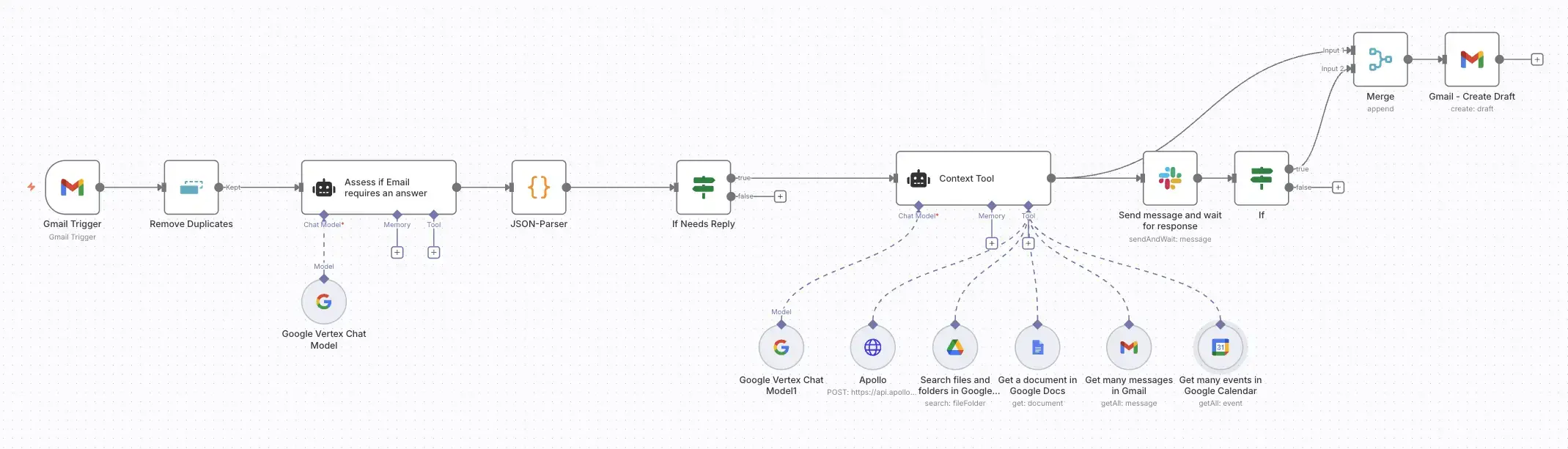
In our previous posts, we've explored building everything from a production-grade Atlassian chatbot to an automated AI news digest. This time, we're tackling the most universal business bottleneck of all: the email inbox. We're going beyond simple filtering and canned responses to build a true AI Email Autopilot—a system that understands the context behind every message and drafts thoughtful, personalized replies.
This workflow uses n8n at its core, connecting to a suite of tools like Google Calendar, Google Drive, and your CRM. It leverages a powerful Google Vertex AI (Gemini) agent to not just read an email, but to understand the relationship, history, and commitments surrounding it before writing a single word. The magic isn't just a smarter model; it's richer context.
We've all been there. An email pops up that seems simple on the surface: "Got time to connect tomorrow?" But a truly helpful reply isn't "quick." It's a multi-step investigation that drains mental energy and forces a dizzying amount of context switching.
To answer that one email correctly, you have to:
Only after completing this mental checklist can you craft a reply that is actually useful. Multiply this by dozens of emails a day, and the cost becomes clear. It's not just the time spent; it's the constant shattering of focus that kills deep work and productivity. What if you could have an assistant that does all of that for you, in seconds?
This is exactly what we’re going to build. An AI-powered workflow in n8n that acts as a diligent executive assistant, performing the background research for every important email and presenting you with a perfect, context-aware draft, ready for your approval.
Like our previous projects, we’re using n8n as our automation engine. It is the perfect platform for this task because its power lies in its ability to connect disparate systems, easily. An effective email assistant must talk to your calendar, your file storage, your CRM, and your email client. n8n is providing the tools and flexibility to wire these services together into a single workflow.
This workflow leans heavily on n8n's AI Agent node. We aren't just sending a prompt to an LLM; we're building a stateful agent with a specific identity, a strict set of instructions, and a toolkit of digital "senses." This allows the AI to perform a sequence of actions—like checking the calendar before reviewing past emails—to build a progressively richer picture of the situation before it makes a decision.
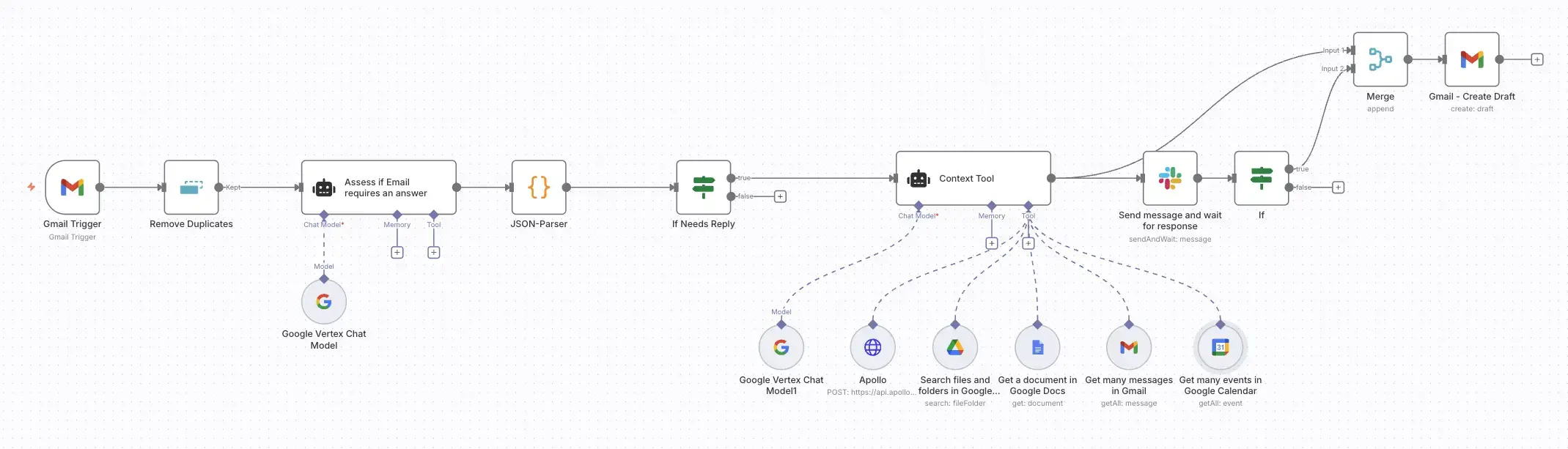
Our workflow is a sophisticated pipeline that transforms a raw incoming email into a fully vetted, context-rich draft, complete with a human-in-the-loop safety net.
| Component | Role in the Architecture |
|---|---|
| Gmail Trigger | The workflow's entry point. It watches for new, non-system emails and passes them on for processing. |
| Deduplication Node | A simple but crucial step to ensure we don't process the same email multiple times if the workflow re-runs. |
| AI Triage Agent | The first layer of intelligence. A fast AI model quickly assesses if the email is junk or actually requires a human response. |
| Context-Aware AI Agent | The brain of the operation. This powerful agent is given a detailed persona and a multi-step mission to gather context using its toolkit before drafting a reply. |
| The Toolkit (Google, CRM) | A set of "senses" for the AI agent, including tools to access Google Calendar, search Gmail, find files in Google Drive, and look up contacts via an HTTP request to a CRM like Apollo. |
| Slack Approval Node | The human-in-the-loop safety mechanism. The AI-generated draft is sent to you in a private Slack message with "Approve" and "Deny" buttons. |
| Gmail Draft Node | The final action. If the draft is approved in Slack, this node creates the reply as a draft in your Gmail, ready for you to hit "Send." |
This architecture ensures that the assistant is both powerful and safe. It automates the tedious research but leaves the final decision to send in your hands.
With the architecture defined, let's dive into the n8n canvas. This workflow orchestrates a series of checks and AI-driven actions to build context before ever drafting a reply. Before you begin, ensure you have credentials configured in n8n for Gmail, Google Calendar, Google Drive, Slack, and any CRM API you wish to connect.
The workflow starts by protecting you from noise.
Gmail Trigger & Remove Duplicates: The workflow kicks off with a Gmail Trigger that polls for new messages. It uses a filter to ignore mail from common no-reply addresses and mail sent from yourself. It immediately passes the email to a Remove Duplicates node to prevent re-processing.
Assess if Email Requires an Answer (AI Agent): The first AI step is a simple triage. The email content is passed to a lightweight AI Agent powered by a fast model like gemini-1.5-flash-latest. Its only job is to decide if the email is substantive or junk.
The Triage Prompt:
Your task is to assess if the message requires a response. Return in JSON format true if it does, false otherwise. Also pass on the id, threadId, content, sender name, email and subject.

Marketing emails don't require a response.

Example:
{
  "requiresResponse": true,
  "id": "12345",
  "threadId": "67890",
  "content": "...",
  "name": "Jim Smith",
  "email": "jim@example.com",
  "subject": "Catching up"
}
JSON Parser & If Node: A Code node parses the AI's JSON output, and an If node checks if requiresResponse is true. If not, the workflow stops. If it is, the email is passed to the main agent.
This is the heart of the workflow. We use a sophisticated AI Agent node with a detailed system prompt that defines its identity, mission, and rules of engagement.
The Main Agent's System Prompt:
👤 Identity You are an advanced AI assistant integrated into an email client, acting on behalf of a user named Michael. Your persona is that of an efficient, proactive, and exceptionally thorough executive assistant.
🎯 Core Mission & Thinking Process Your central mission is to generate a draft email reply that is so accurate and well-informed that Michael can send it with minimal to no edits. To achieve this, you must follow a strict, multi-step process for every email you handle.
Step 1: Immediate Triage Quickly scan the incoming email to identify the sender, their primary request, and the language of the message (English or German).
Step 2: Autonomous Context Gathering (Mandatory) Before you begin writing, you must autonomously gather a complete picture of the situation using your available tools.
Check the Calendar (Calendar tool): To understand Michael's current and future availability.
Review Past Conversations (Email tool): To understand the relationship and communication style with the sender.
Find Related Documents (Google Drive tool): To find project notes, agendas, or any shared documents.
Verify Contact Details (CRM/Apollo): To understand the sender's role and importance.
Step 3: Synthesize and Strategize Once your tool use is complete, pause and create a silent, internal summary of all the information you've gathered.
Step 4: Draft the Response
Language Matching: Critically, you must respond in the same language as the incoming email. If the sender writes in German, your draft must be entirely in German.
Directly address the sender's request.
Seamlessly weave in the context you found.
Mirror the established tone from past emails.
Conclude with "Best regards, Michael" (or the German equivalent).
🛠️ Rules for Tool Use
Never Assume, Always Verify. Use a tool if the information can be found.
Do not refer to the names of your tools in the final draft. Instead of "The Calendar tool shows you are busy," say, "It looks like my schedule is packed today."
The real power of this agent comes from the tools we give it. The AI Agent node has several tool nodes connected to it:
getAll events, allowing the agent to check for free/busy slots.getAll messages, which the agent can use to search for past conversations with the sender.search for files and folders, enabling the agent to find relevant documents by searching for the sender's name or company.The AI agent will intelligently decide which of these tools to use, in what order, based on the content of the email.
We believe in empowerment, not full, unchecked autonomy. The output of the AI Agent is a carefully drafted message, but it isn't sent automatically.
Send message and wait for response (Slack Node): The generated draft is sent to a private Slack channel or DM. This node is configured to post the message along with two action buttons: "Approve" and "Deny." The workflow then pauses, waiting for your input.
If Node: This node checks the response from Slack. If you click "Approve," the workflow continues to the final step. If you click "Deny," it stops.
Gmail - Create Draft (Gmail Node): Upon approval, the final node takes the AI-generated text and creates a new draft in your Gmail, correctly threaded to the original conversation. It's ready for a final glance and for you to personally hit "Send."
Let's see the magic in action with the scenario from earlier.
Email In: You receive an email from jim@partner-org.com: "Hey Michael, great chat last week. Got time to connect tomorrow to discuss the partnership details?"
The Autopilot's Internal Process (takes ~30 seconds):
Slack Approval: You get a notification on Slack:
New Email Draft for: Jim Smith Hey Jim! Tomorrow’s packed on my end, back-to-back all day. Thursday AM is free if that works for you? Can you send an invite.
[ Approve ] [ Deny ]
Final Action: You click "Approve." A perfectly formed reply is instantly created as a draft in your Gmail. All you have to do is send it.
What we've built here is far more than an email auto-responder. It's a functional blueprint for a context-aware AI agent. The true innovation lies not in the Large Language Model itself, but in the orchestrated ecosystem of tools that feed it rich, relevant, and real-time information. By grounding the AI in the facts of your digital life—your calendar, your documents, your relationships—we transform it from a clever text generator into a genuinely helpful assistant.
This pattern of Triage -> Context Gathering -> Synthesis -> Human-in-the-Loop Approval is a powerful and safe framework that can be adapted for countless business processes. By replacing the email trigger with a different event (a new CRM ticket, a customer query, a project alert) and swapping the toolkit, you can build autonomous agents to support sales, customer service, project management, and more.
The era of AI productivity is not about replacing people; it's about building tools that augment them. This Email Autopilot doesn't take away your control; it gives you back your most valuable resource: time and focus.
This workflow is just the beginning of what's possible when you combine automation capabilities with modern AI. Whether you want to implement this exact solution, adapt it for your specific tools, or explore other AI-powered automation ideas, we're here to help.
Contact us to discuss how we can build custom AI workflows that give you back hours of your day while maintaining the human touch your business relationships deserve.
Build an automated workflow gathering AI news from multiple sources. Use LLMs to…
A Deep Dive into Building a Slack-to-Atlassian AI Chatbot with n8n, MCP, and Kub…

How I built a fun conference booth experience combining an open-source robot, vi…
Get a shared vocabulary of proven Transformation Patterns, common Anti-Patterns, and Paradigm Patterns to have more effective, data-driven conversations about your strategy and architecture.
For a personalized starting point, take our free online assessment. Your results will give you a detailed report on your current maturity and suggest the most relevant patterns to focus on first.
Every Tuesday, we deliver one short, powerful read on AI Native to help you lead better, adapt faster, and build smarter—based on decades of experience helping teams transform for real.